This is a post about how to code stuff in WordPress. If you’re a regular reader who doesn’t care about this stuff, just skip it. I won’t be offended.
I’ve spent so many hours frustrated at this. I scoured the web for “how to” articles, and none of them actually solved my problem… so here is the solution I’ve sued to get the “like this” button working on all of my posts on my blog in both the index.php page and in my own second loop in the sidebar…
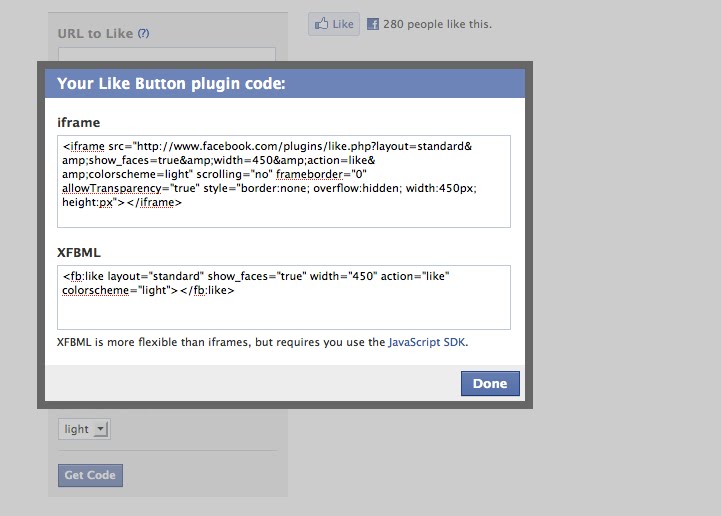
The iframe version of the like button worked really easily – it was only the FBML button I had problems with (which has cooler features). I couldn’t figure out how to get the FBML Facebook Like option to work on WordPress without using a plugin. I don’t like plugins (if I can code it myself).
Here are the steps I took that I think solved my problem (I will try adding some things I removed back in to see if they break what I’ve done).
Step 1. Remove any “Facebook Share” plugins or code already in your posts. I read on one of the plugins that it might clash with preexisting Facebook code.
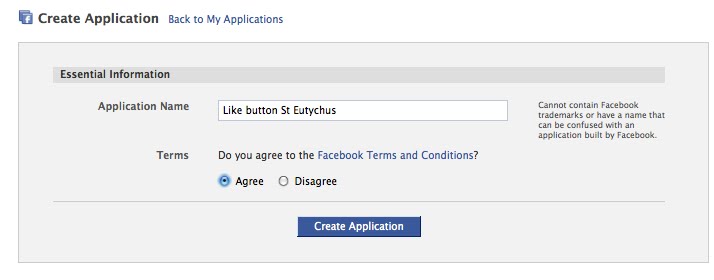
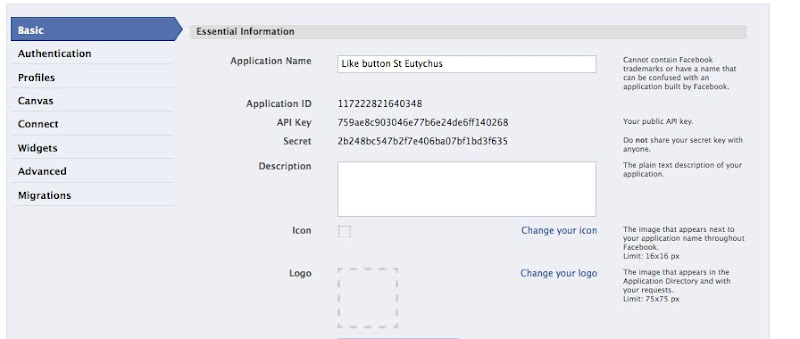
Step 2. Set up your “application” on Facebook.
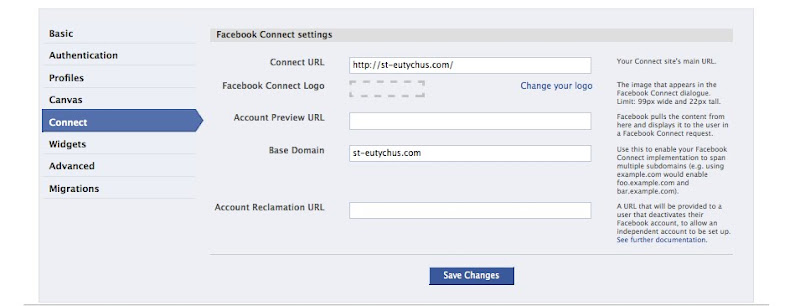
In the set up options go to the “Connect”… make sure you put your URLs in the “connect” page.
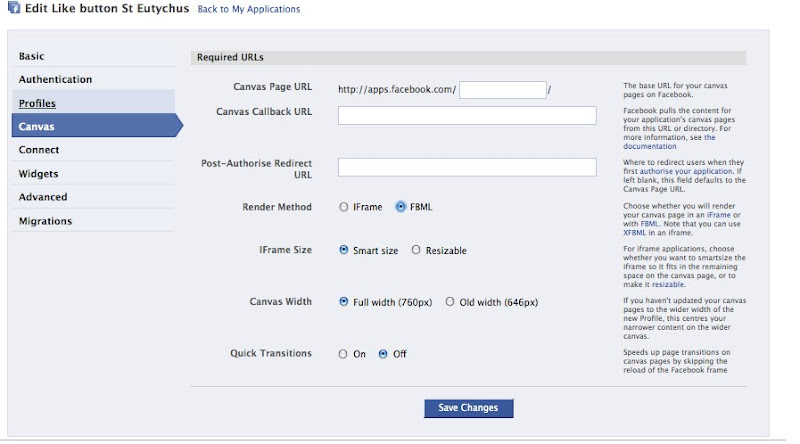
I suspect, though I’m not sure, that you need to choose the FBML option on the Canvas page.
Step 3. Now you need to put some code in your header.
<html xmlns="http://www.w3.org/1999/xhtml"
 xmlns:og="http://opengraphprotocol.org/schema/"

xmlns:fb="http://www.facebook.com/2008/fbml">
And this…
 <meta property="og:site_name" content="YOUR BLOG NAME"/>

<meta property="og:title" content="<?php the_title_attribute( '' ); ?>"/>

<meta property="og:type" content="blog"/>

<meta property="og:image" content="THE URL TO THE IMAGE YOU WANT PEOPLE TO SEE ON FACEBOOK"/>

<meta property="fb:app_id" content="THE APP ID NUMBER FROM FACEBOOK (SEE BELOW)"/>
For example:
 <meta property="og:site_name" content="St. Eutychus"/>

<meta property="og:title" content="<?php the_title_attribute( '' ); ?>"/>

<meta property="og:type" content="blog"/>

<meta property="og:image" content="http://st-eutychus.com/wp-content/themes/whiteplus/images/headertitle.png"/>

<meta property="fb:app_id" content="116899985006841"/>
Step 4. Insert the SDK code. Go to your footer.php and stick this block of code in before the you close your body tag (</body>)... this is the JavaScript SDK thing that Facebook talks about here – it allows you (because it’s in your footer) to call the “like” function from any page that uses your footer. Make sure you put your app ID in the spot that says YOUR APP ID.
<div id="fb-root"></div>

<script type="text/javascript">

window.fbAsyncInit = function() {

FB.init({

appId: 'YOUR APP ID',

xfbml: true

});

};

(function() {

var e = document.createElement('script'); e.async = true;

e.src = document.location.protocol + '//connect.facebook.net/en_US/all.js';

document.getElementById('fb-root').appendChild(e);

}());

</script>
Step 5. Insert the Like Button Code. Facebook’s default “like button” code won’t help you much if you want the address for individual posts to be sent through to your profile (and hopefully those of your friends when they like what you’ve written. You need to change the URL option to call the post’s permalink. Facebook will generate you a block of code that will give you options like having your friends photos appear when they like your post and stuff. I don’t want that. Put this where you want the like button to appear. Here’s the code I used:
<fb:like width="340" height="30" layout="standard" show_faces="false" href="<?php the_permalink() ?>" colorscheme="default"></fb:like>
There may be something to factor in depending on how your link structure works – some other posts I read had a couple of extra options around the permalink)… they use something like this: <?php echo urlencode(get_permalink($post->ID)); ?>







IntenseDebate
So I’ve been using IntenseDebate for my comments for a while now. And while it allows cool features like giving you the ability to post YouTube Videos and pictures, to log in using various online accounts (like Facebook or Twitter) or as a guest, a pretty good spam filter, and the ability to vote comments up or down – it can be a little bit slow and annoying.Plus, nobody uses those features anyway.
I’m thinking about canning it. What do you reckon? If you’re hanging around wishing you could comment but put off by complexity just “like” this post and I’ll assume that’s your indication that I should kill the system.
While you’re telling me what you think of that system feel free to raise any other things that annoy you about the design or technology behind this blog… I’m always interested in fixing those issues because it gives me a chance to play with code and design stuff.
Over to you.
April 28, 2010